Context, tools & MCP
Feed the agent precise context and extend it with commands and MCP.
Give the agent the right context
After this you can scope an agent task with the minimum context that makes it succeed.
Garbage context in, garbage change out.
Context is not a pile of files. It is the evidence Agent needs to make one decision at a time. A small bug fix may need the failing test and one implementation file. A migration may need the old pattern and the target API docs.
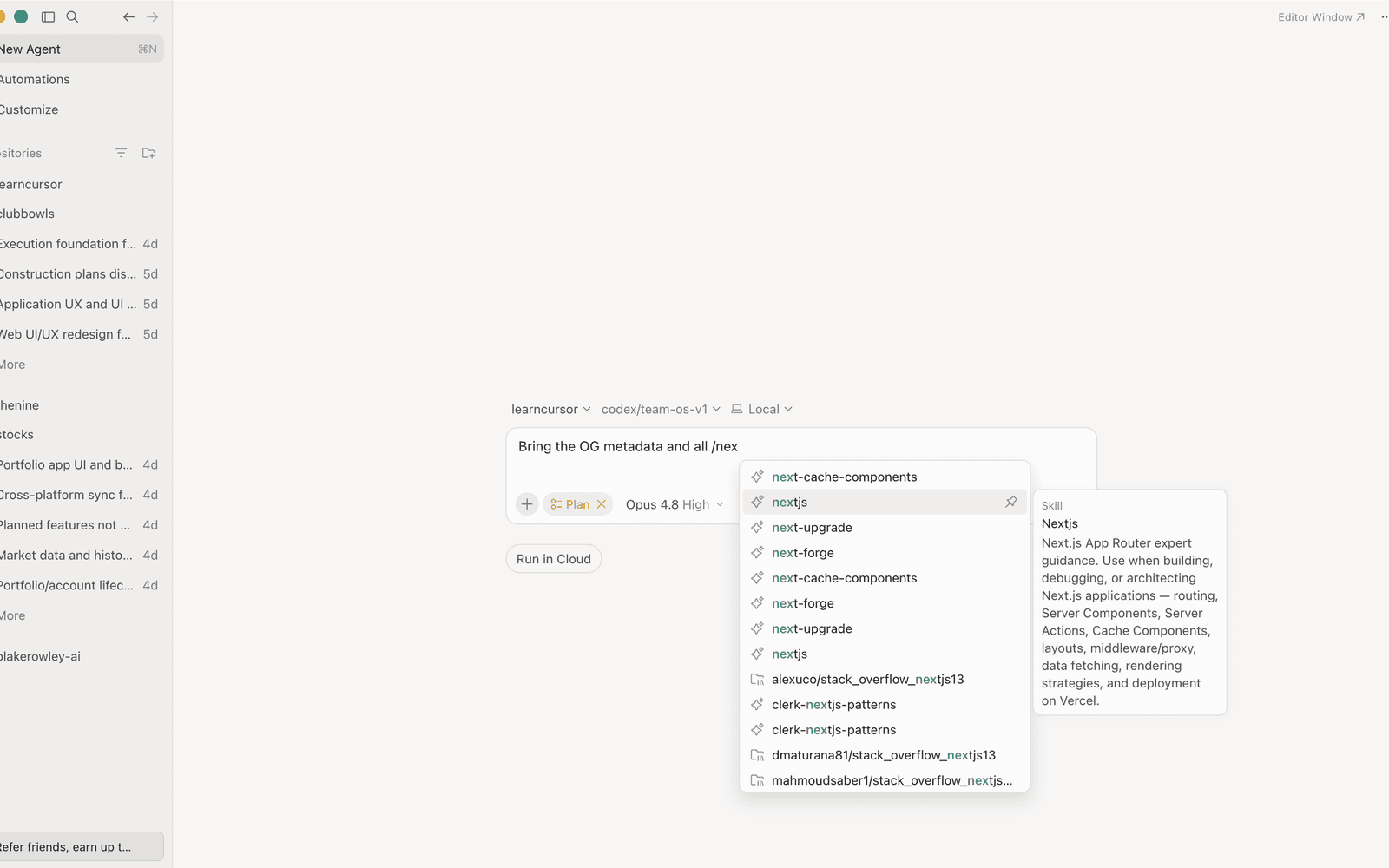
The slash picker is one way to pull a saved workflow or skill into the run — context can be a command, not just a file.
The skill is choosing enough context to remove guessing without flooding the run. Before you send a task, attach only what it needs:
@fileor@folder: the code the change lives in.@docs: the API or library reference.- A failing test or exact error.
Task: Fix the failing checkout total test.
Attach the failing test and the one pricing handler it calls — nothing else.
Say why: the test defines done, the handler is where the fix lands.
More context is not more help.
Attach the smallest set that fully specifies the task.
Takeaway. Point Agent at the few files and docs that matter.
Self-check
QWhat's the single most useful piece of context for a bug-fix task?
Tools, terminal and MCP
After this you can name what Agent can reach beyond your files: terminal commands and MCP tools.
Tools are reach: some live in your terminal, some come from an MCPModel Context Protocol. A standard that lets an AI agent pull in context from outside the repo, like Jira tickets or internal docs. server outside the repo.
Think of tools as reach, not authority. Terminal access helps Agent prove a change locally. MCPModel Context Protocol. A standard that lets an AI agent pull in context from outside the repo, like Jira tickets or internal docs. can connect it to docs, databases, issue trackers or internal services. Both need a clear boundary around what may run automatically and what should wait for approval.
- Need
- Run tests / build after a change
- Reach for
- Terminal commands
- Need
- Query your database or an internal API
- Reach for
- An MCPModel Context Protocol. A standard that lets an AI agent pull in context from outside the repo, like Jira tickets or internal docs. server
- Need
- Pull live docs for a library
- Reach for
- @docs or an MCPModel Context Protocol. A standard that lets an AI agent pull in context from outside the repo, like Jira tickets or internal docs. docs tool
| Need | Reach for |
|---|---|
| Run tests / build after a change | Terminal commands |
| Query your database or an internal API | An MCPModel Context Protocol. A standard that lets an AI agent pull in context from outside the repo, like Jira tickets or internal docs. server |
| Pull live docs for a library | @docs or an MCPModel Context Protocol. A standard that lets an AI agent pull in context from outside the repo, like Jira tickets or internal docs. docs tool |
Command execution can be gated behind your approval. Keep destructive commands on a tight leash.
Decide what runs automatically and what waits for you.
Takeaway. Agent can run commands and call MCPModel Context Protocol. A standard that lets an AI agent pull in context from outside the repo, like Jira tickets or internal docs. tools.
Self-check
QAgent needs to read rows from your production Postgres. What gives it that reach?